Software for Everyday Life: How Digital Programs Make Tasks Easier
Introduction
Software is deeply connected to modern everyday life. People use it when checking messages, preparing documents, paying bills, watching videos, ordering products, studying online, managing appointments, and communicating with others. Although many users think mainly about the device in their hands, it is software that enables much of the functionality they depend on.
Different software programs are designed for different purposes. Some organize information, some automate repetitive work, while others provide communication, entertainment, education, or professional tools.
Understanding how software fits into everyday activities can help users choose better digital tools, avoid unnecessary programs, and make more effective use of the technology they already own.
What Role Does Software Play in Daily Life?
Software acts as a bridge between people and electronic devices. Without suitable programs, a powerful computer or smartphone would have limited practical value.
When a person taps an icon, types information, selects an option, or gives a voice command, software interprets the action and tells the device what to do.
For example, when someone opens a photo editing program, the software provides tools for cropping, adjusting brightness, changing colors, and saving the final image.
This simple interaction represents a much larger process involving the operating system, hardware, storage, and software instructions.
Common Types of Software People Use Every Day
Communication Software
Communication programs have changed how people stay connected.
Messaging applications, email programs, video meeting tools, and collaboration platforms allow people to communicate almost instantly.
A family member can send a message from another city, while a remote employee can participate in a business meeting without traveling to an office.
Productivity Software
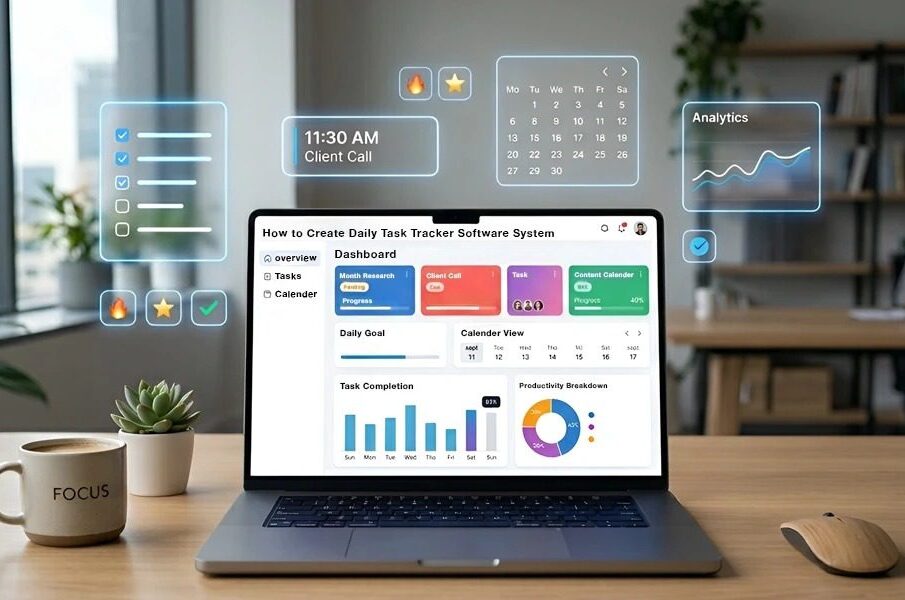
Productivity software helps people organize and complete work.
Examples include:
- Word processing programs
- Spreadsheet applications
- Presentation software
- Calendar tools
- Note-taking programs
- Task management systems
A student might use a word processor for an assignment and a calendar application to organize examination dates.
Financial Software
Many people use digital tools to manage personal finances.
Financial applications can help users monitor expenses, organize budgets, review transactions, and keep track of financial goals.
The convenience of digital financial management also makes security particularly important.
Educational Software
Educational software supports students, teachers, and independent learners.
It may provide lessons, quizzes, interactive exercises, digital books, language practice, or classroom management features.
For example, a learner studying a new language can use software to practice vocabulary and pronunciation at a convenient time.
Entertainment Software
Software also powers many forms of digital entertainment.
Music players, video applications, games, photography tools, and creative programs allow users to enjoy and create digital content.
Software for Work and Business
Businesses depend on software to manage routine operations.
Managing Customer Information
Customer relationship systems can help businesses organize contact information, sales activities, support requests, and communication history.
Instead of keeping customer details across separate files, a centralized system can make information easier to retrieve.
Managing Employees
Organizations may use software to manage employee records, attendance, schedules, recruitment, and other administrative processes.
Tracking Inventory
Retailers and other businesses can use inventory software to monitor stock levels and product movement.
For example, when a product is sold, the system may automatically update the available inventory.
Managing Projects
Project management software can help teams organize tasks, deadlines, responsibilities, and progress.
This is particularly useful when several employees are working on the same project.
How Software Saves Time
One of the most important advantages of software is automation.
Consider a business that sends the same type of reminder to hundreds of customers. Sending every message manually would take considerable time.
Appropriate software can automate reminders based on predefined conditions, allowing employees to focus on more valuable activities.
Reducing Repetitive Calculations
Spreadsheet programs can automatically perform calculations and update results when information changes.
Organizing Large Amounts of Data
Software can search, sort, filter, and categorize information much faster than manual methods.
Creating Reports
Business software can use stored information to generate summaries and reports, reducing the need for employees to compile everything manually.
Choosing Software for Personal Use
Not everyone needs advanced software. The right choice depends on the user’s specific routine.
Identify the Problem
Start by asking what task is difficult, slow, or inconvenient.
If you frequently forget appointments, a calendar application may be useful. If you struggle to organize household expenses, budgeting software could be more appropriate.
Avoid Unnecessary Complexity
A simple program that performs one task well can be more useful than a complicated platform filled with features you never use.
Check Device Compatibility
Make sure the software works with your computer, smartphone, tablet, or other devices.
Consider Privacy
Before entering personal information, understand what data the software collects and how it handles that information.
Choosing Software for a Business
Businesses should take a more structured approach because software can affect employees, customers, data, and daily operations.
Consider the Number of Users
A solution suitable for one person may not be appropriate for a large team.
Evaluate Access Controls
Employees should have access to the information necessary for their roles without receiving unnecessary permissions.
Check Integration
Software that works well with existing systems can reduce duplicate data entry and improve workflow efficiency.
Think About Scalability
The software should ideally be able to support business growth without becoming impractical.
Software and Data Security
Software can make life easier, but it can also create risks when poorly managed.
Users should take sensible precautions when installing or using programs.
Download From Trustworthy Sources
Using reputable sources can reduce the risk of installing modified or malicious software.
Keep Programs Updated
Updates may address security weaknesses and technical problems.
Use Strong Account Protection
Accounts associated with important software should use strong passwords and additional security measures where available.
Be Careful With Permissions
Before granting an application access to contacts, files, location, cameras, microphones, or other resources, consider whether that access is necessary.
Free Software vs. Paid Software
Software is available under many different pricing models.
Free Software
Free programs can be excellent for basic tasks, education, personal projects, and users with limited requirements.
However, users should still consider privacy, support, updates, and limitations.
Paid Software
Paid programs may provide advanced functionality, professional support, additional storage, or features designed for business users.
The best choice depends on the value the software provides rather than the price alone.
How to Keep Software Organized
Installing too many programs can make devices harder to manage.
Remove Unused Programs
If software is no longer needed, uninstalling it can reduce clutter and free storage.
Keep Important Programs Updated
Regular updates can help maintain compatibility and security.
Organize Files
Software is more useful when files are stored in a logical structure. Clear folder names and consistent organization make information easier to find.
Example: A Typical Workday
Consider a person working remotely.
In the morning, they may use calendar software to review appointments. They then open communication software for a team meeting, a document editor to prepare a report, a spreadsheet for financial information, and a project management application to check deadlines.
Later, they may use cloud storage to share documents with colleagues.
Although these programs serve different purposes, together they form a digital working environment.
Common Mistakes With Software
Installing Programs Without a Purpose
Installing software simply because it looks interesting can create unnecessary clutter.
Ignoring Updates
Old software can create compatibility and security problems.
Using the Same Password Everywhere
Reusing passwords can increase risk if one account becomes compromised.
Choosing Software Only Because It Is Free
Price should not be the only consideration. Reliability, privacy, usability, and support may be more important.
Not Backing Up Important Data
A software problem or hardware failure can sometimes result in data loss. Important information should be backed up appropriately.
Frequently Asked Questions
Why is software important in everyday life?
Software allows people to communicate, work, learn, organize information, manage finances, and enjoy digital entertainment.
Can software make work faster?
Yes. Software can automate repetitive tasks, perform calculations, organize information, and simplify communication.
Is free software safe?
Free software can be safe, but users should consider the source, permissions, privacy practices, update history, and reputation of the provider.
How often should software be updated?
Important updates should generally be installed when they are available and compatible with the user’s system, particularly security updates.
Why should unused software be removed?
Removing unnecessary programs can reduce clutter, free storage, and simplify device management.
Can one program replace several applications?
Sometimes. Some platforms combine multiple functions, but a specialized application may still perform a particular task better.
Conclusion
Software has become an essential part of everyday life, helping people communicate, organize information, complete work, learn, manage finances, and enjoy entertainment.
The best software is not necessarily the one with the most features. It is the one that solves a real problem, is easy to use, works reliably, and fits the user’s needs.
By choosing software carefully, keeping it updated, protecting accounts, and removing unnecessary programs, users can create a more efficient and manageable digital environment. As technology continues to evolve, software will remain one of the most important tools for turning electronic devices into useful everyday solutions.